

One-Time Device Credit
The $20 firmware fee is one-time for one Nano. The first verified flash locks the credit to that device.
I’ve secured funding for another month of HashPowerOS development, so I’m continuing to fix bugs and release updates! Everything runs directly on your miner—no Avalon app required. From Wi-Fi setup and split-pool mining to advanced controls, HashPowerOS puts convenience and freedom in your hands. Keeping development going beyond this month depends on new customers and community support. Every license purchase helps cover recurring costs, and every share helps us reach more users. Please spread the word and help keep this project moving! You own the device. Use it the way you want to. HashPowerOS makes that possible.
Avalon Nano 3S custom firmware OS portal
Install persistent on-device performance controls on the Avalon Nano 3S without scripts, remote shells, or a desktop utility running in the background. Downloads are protected by reusable one-device flash credits. Your $20 one-time per-device credit is device-locked to the first Nano 3S you verify. Restoring that same Nano back to stock returns the usable flash count, but the credit remains locked to that device for the lifetime of the product.
Factory recovery is public and does not require a key. Supplying the key previously used on the same Nano is optional and allows the server to return an eligible used flash credit after the device identity and completed restore are verified.
Step 1 · Windows prerequisite
Windows must use WinUSB for the Nano's K230 boot device before any browser can flash it. Complete this once on each Windows computer, then move to BOOT mode below.
Never replace the driver for a keyboard, mouse, storage drive, phone, or USB hub. The correct target is the Nano 3S K230 boot device with USB ID 29F1:0230.
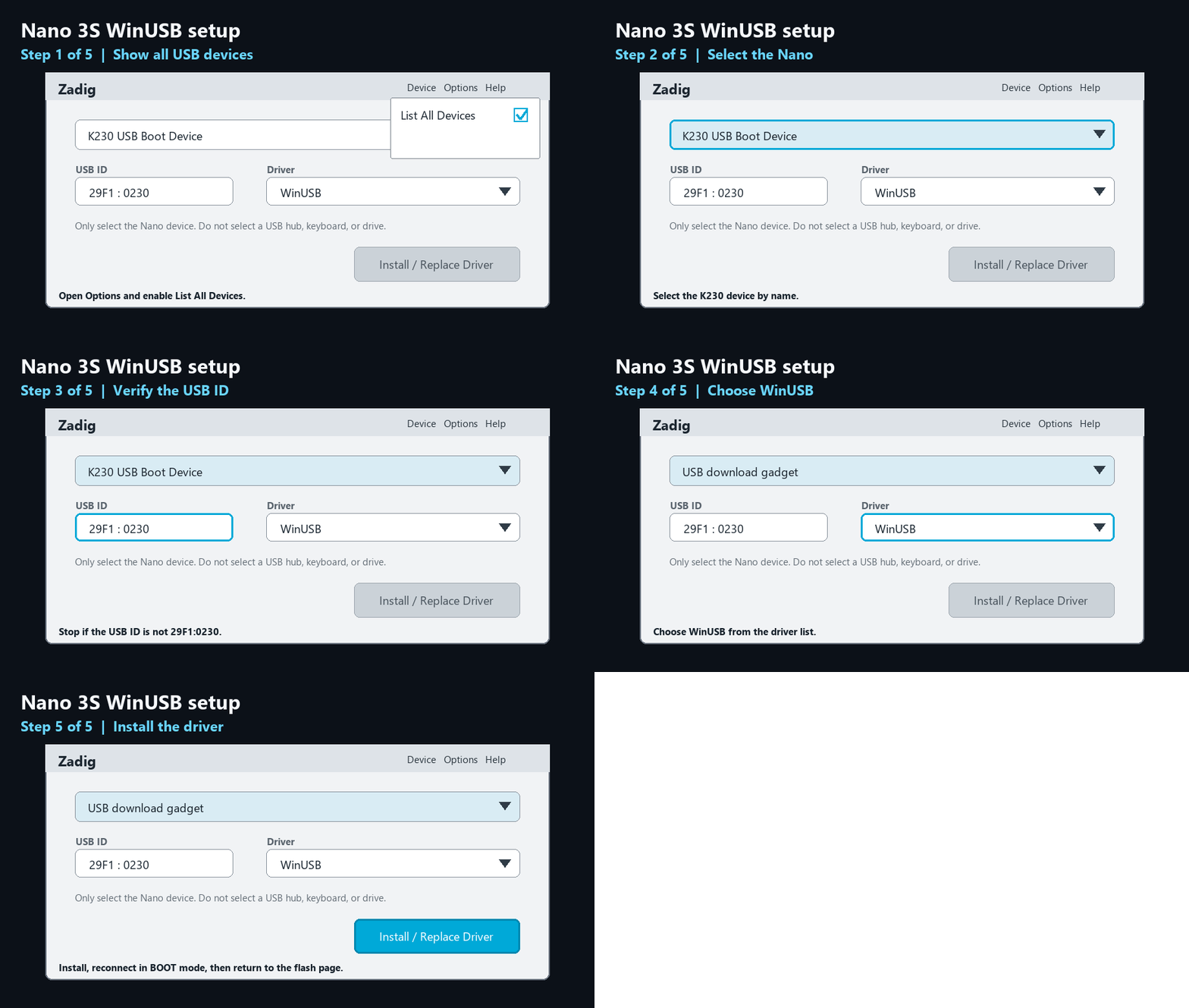
Step 2 · Required before custom or factory flashing
Follow this connection order exactly. BOOT mode is successful when Windows identifies K230 USB Boot Device with USB ID 29F1:0230. If the normal Avalon screen starts, power off and repeat from step 1.
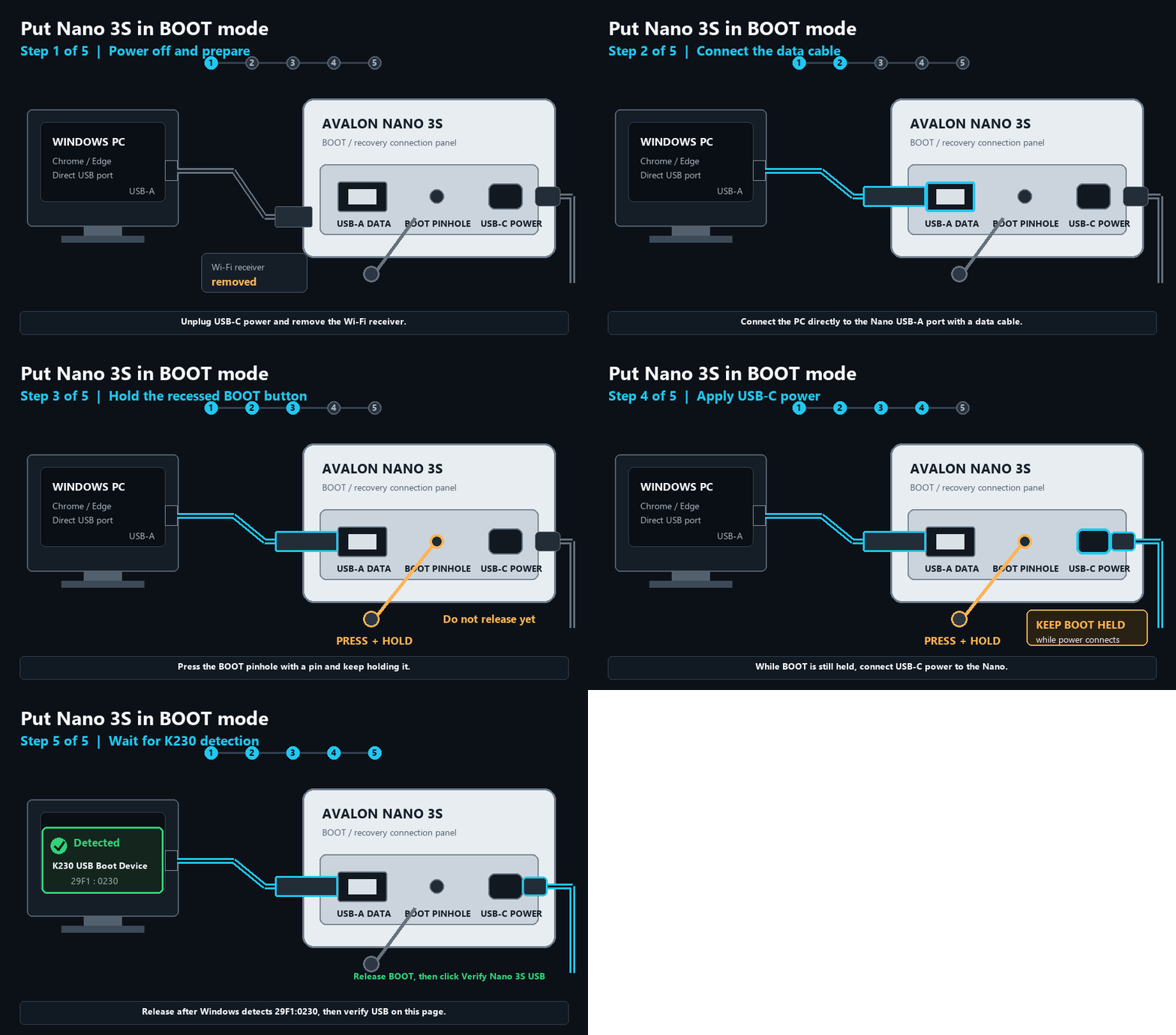
BOOT must already be pressed when USB-C power is connected. Pressing BOOT after the Nano begins its normal startup will not enter recovery mode.
Step 3 · Verify and flash
Enter a license key and create a session.
Use this when you want to return a Nano 3S to stock firmware or recover from a bad custom flash. When stock browser flashing is available, this page writes the stock KDIMG through the same USB process as custom firmware.
File Avalon_Nano3s_release_Udisk_2026040201_13503fb.aup.img.gz | Version 2026083004 | 35.9 MB | updated 2026-08-30 13:05:00 UTC | SHA-256 4c646f41a2403d4efe3dbc6ecef576aab237966df2abf20663eedeec359922ef
Factory recovery is available without a license. A valid device-bound key is optional and returns an eligible used credit only after the same Nano is restored.
Factory reset uses the physically proven, reproducibly built full ten-partition image. On first boot, bounded cleanup preserves factory identity and calibration data while removing all non-factory settings, HashPower data, and logs.
Supported device: Avalon Nano 3S. This browser flasher is built for HashPower OS custom firmware and factory restore images for the Nano 3S.
The $20 firmware fee is one-time for one Nano. The first verified flash locks the credit to that device.
Restore a supported Nano 3S without a license. An optional same-device key returns an eligible used flash credit after hardware verification.
This page verifies your key and USB device, checks image integrity, and writes approved firmware through the browser with clear progress and recovery guidance.